 CncCraft
Introduction
CncCraft is a free, parametric CAD/CAM program for beginners: you design parts for a CNC router with dimensions you can change, compute the toolpaths and hand them to the machine as a file.
Parametric means: a dimension is not a fixed line but a value you can change at any time – and everything tied to it follows. Write the board width as the variable breite, for example, and holes, distances, construction lines and toolpaths move along when you change breite. What professional CAD programs like Fusion 360 can do, CncCraft brings in a simple form – no licence, no subscription, no account.
The path from idea to milled part has three stages in CncCraft, all in one window:
- Design: you draw shapes or type dimensions – numbers, variables or formulas. Layers, snapping, construction lines and constraints help you work precisely (start here: Parametric design – overview).
- Generate toolpaths: you select shapes and say what the router should do with them – cut out, clear a pocket, mill a slot, drill or carve lettering with a V-bit. For the chosen material CncCraft suggests matching cutting values and warns when one is too high.
- Output: after a preview in 2D or 3D you save the toolpaths as G-code.
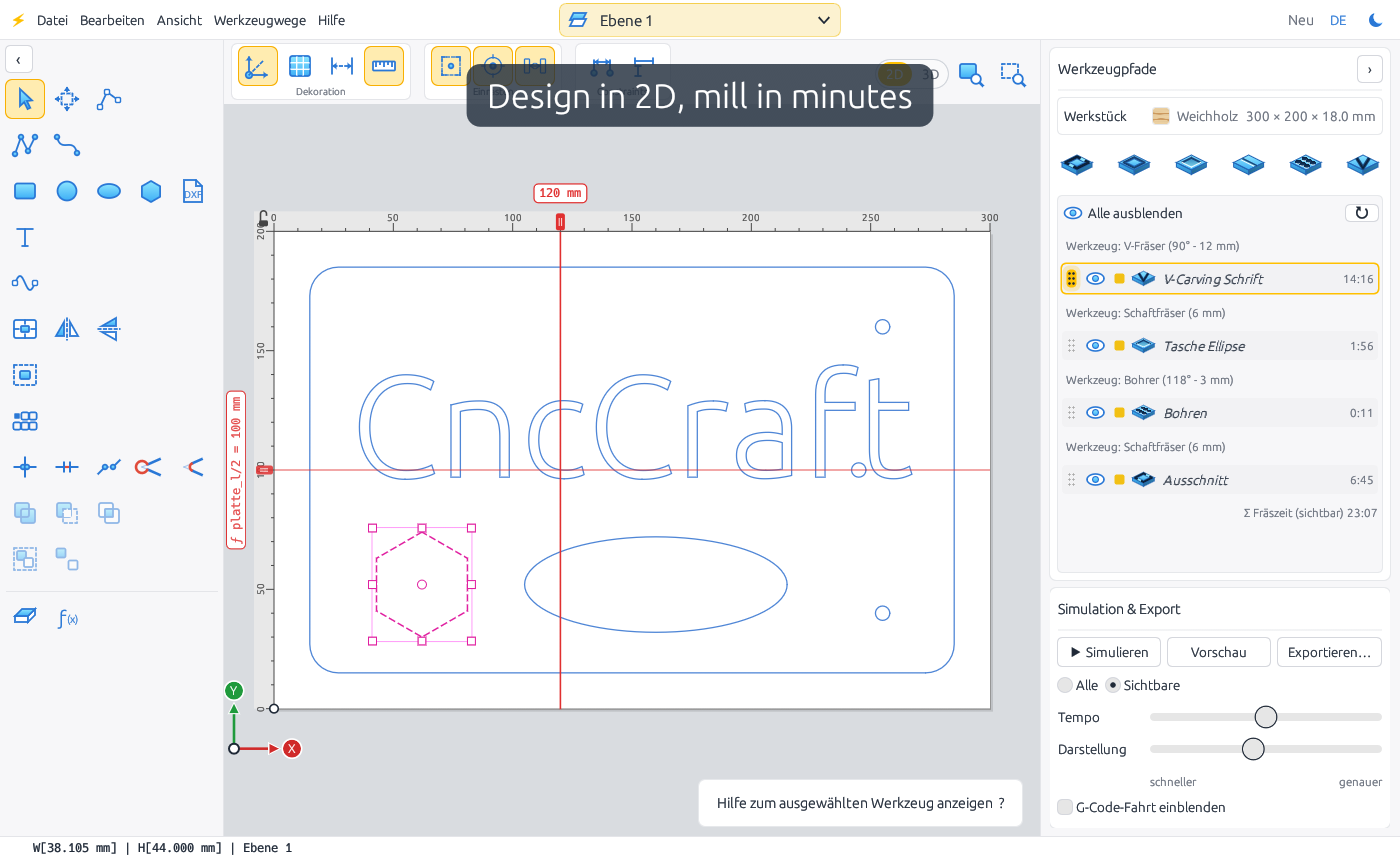
The window at a glance
| Area | What you find there |
|---|---|
| Menu bar (top left) | File, Edit, View, Toolpaths, Help. |
| Layer picker (top centre) | The active layer and the list of all layers. See Layers. |
| Toolbar (left) | Drawing and editing tools, plus job setup and variables. |
| Header above the drawing | Decoration (origin, grid, snapping, dimensions, rulers) and constraints; the view buttons on the right. |
| Drawing area (centre) | The workpiece with rulers, construction lines and your shapes – or the 3D preview. |
| Toolpaths (right) | Board setup, the buttons for new toolpaths, the list, preview and output. |
| Status line (bottom) | Size of the selection, pointer position and the layer of the selection. |
More on the The design view page. To dive straight in, open the “sign with lettering, pocket and holes” example on the start page and see what a finished job looks like.
CncCraft is a standalone re-creation that follows Spark by Vectric and extends it in places. Only what CncCraft can do is documented here.